• Skip to primary navigation
  • Skip to main content
  • Skip to footer
the Speak Agent logo

Speak Agent

  • About
    • About Speak Agent
    • Learning Supports for ELs and MLs
    • Helping Teachers
    • Teacher Spotlights
    • #1 in Instructional Technology
    • Awards and Media Coverage
    • WIDA ELD Standards
  • Programs
        • Programs Overview
        • What We Offer

        • Math + Language
          • Upper Elementary
          • Middle School
          • High School
          • Language in the Math Practices
        • Science + Language
          • Middle School
          • High School
  • Research & Evidence
        • Research Overview
        • What We've Learned

        • A Summary of Impact Studies
        • Four Hours, 10% Higher Math Scores
        • NSF Study Results with Science + Language
        • Student Engagement Matters!
        • The Learning Science Behind Speak Agent
        • Putting Theory into Practice
        • Effective for Multilingual Learners
        • ESSA Evidence
  • News & Insights
  • Talk to Us!
  • Sign In
  • Get Support
Home › The Language of Content

Platform Update | September 2026

September 23, 2026

The new Speak Agent version 3.9.3 speeds up lesson search with “search as you type” on the Lessons menu. Here are the details:

Search as You Type

  • The “search as you type” feature helps you search our lesson library and find the right lesson more quickly!
  • First, go to the Lessons menu on the left-hand menu.
  • Next, search by lesson title or keyword. Just start typing in the Search Lessons textbox. You don’t need to type the whole title or topic; one word will usually do the trick:
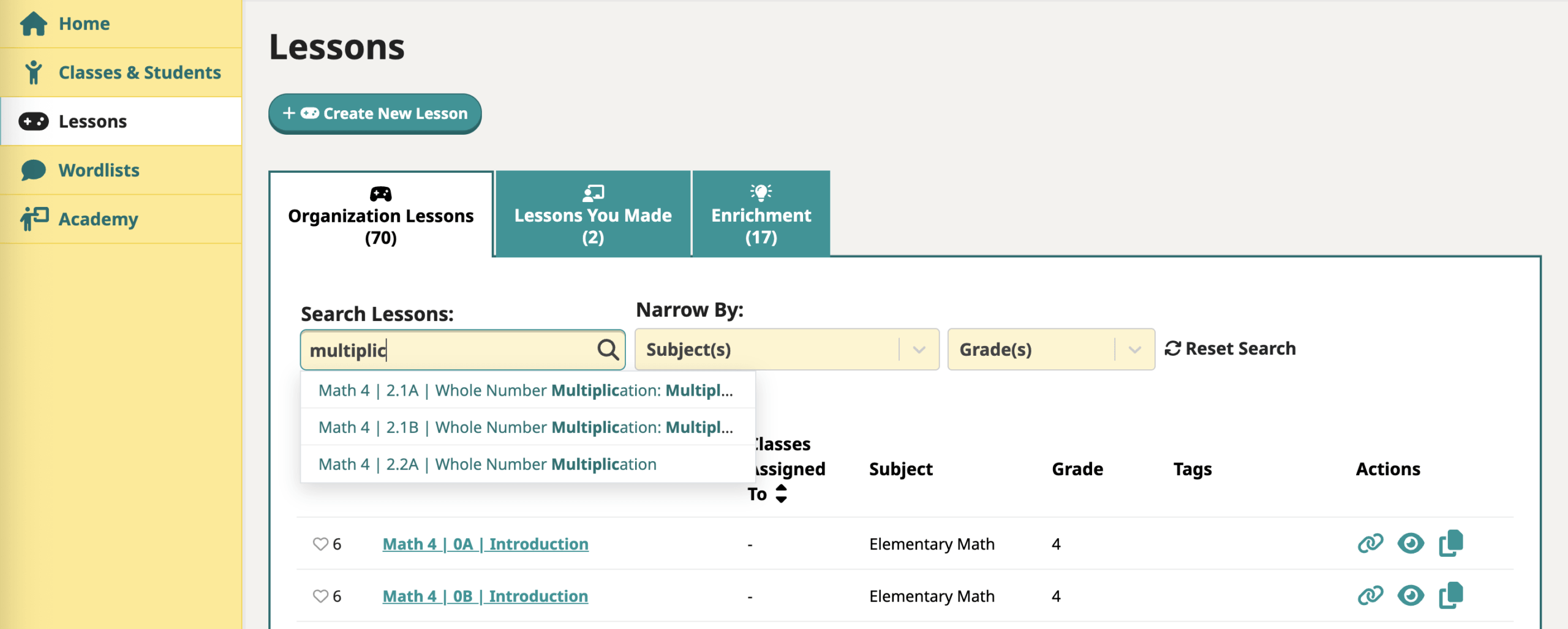
    A screenshot of the search-as-you-type feature in Speak Agent
  • If we have relevant content, you will see up to a maximum of three results display just below the search box.
  • Click the search result that best matches what you want and it will show the result in the table below like so:
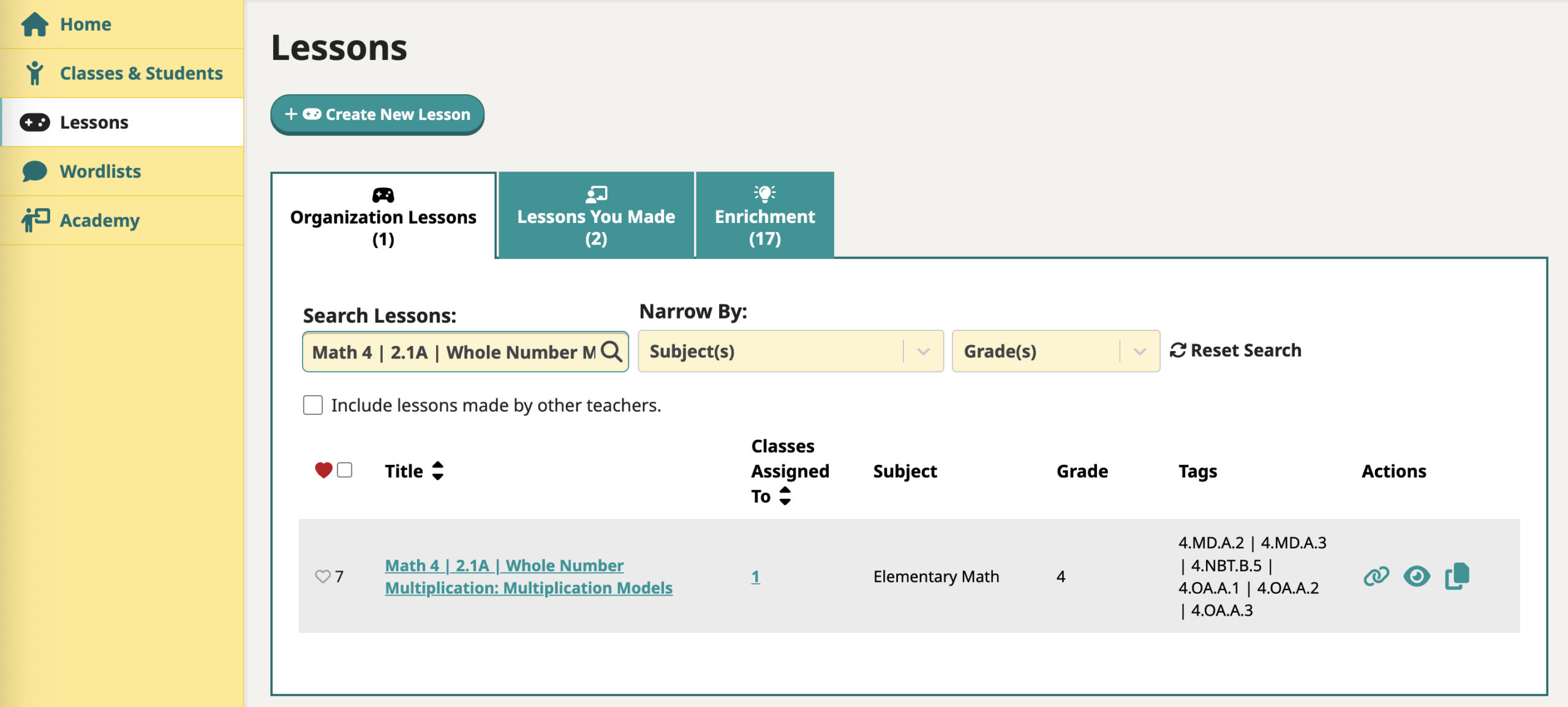
    A screenshot of the search-as-you-type search results in Speak Agent
  • You can click the lesson title in the table row to open it, or click the eye icon Preview icon in Speak Agent to preview it as a student would see it.

Troubleshooting

If you see three results, but none of them are relevant, try searching without “search as you type.”

  • First, press Reset Search to clear the search box and filters.
  • Then press the return or enter key when you search, instead of clicking an item on the list.

Bug Fixes

Loading Issue

Some students have been experiencing an issue with loading their Home page in Speak Agent, seeing gray bars where content should appear. This is an issue with communication of login data from Clever to Speak Agent. This release version 3.9.3 provides a solution to the issue. If this issue still happens for you, please contact us!
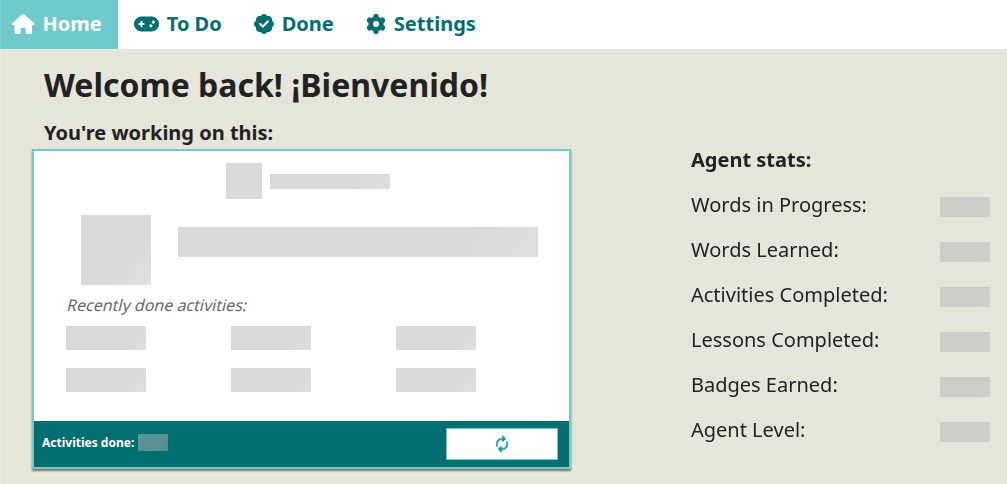
A screenshot of a student home page in Speak Agent with grey loading bars

Scrolling Issue

We have heard reports of a few students getting stuck with Math Problem Maker. It turns out that there were a couple of steps where, at low screen resolution or certain text sizes, the navigation to move to the next step of the activity gets blocked. We think we have solved for this with version 3.9.3, but please contact us if you have a student who still has this issue!

Translation Bug

There was a bug with translation in the Vocab Lab activity. This is now fixed, too.


What’s Next?

Next, we are working on a new experimental feature that evaluates Read Along responses against a writing rubric. We plan to first test this feature on a pilot basis for several months before incorporating it into our platform. More on this next update!


As always, we’d love to hear from you if you’d like to share feedback on the new features or share your wishlist. So please don’t hesitate to contact your support team!

Written by Katie Cunningham

Katie is CTO and Co-Founder of Speak Agent, Inc. A leading expert in the Python programming language, Katie designed the Speak Agent architecture and wrote the very first line of code for the current platform. She is an accomplished technical author and keynote speaker worldwide, as well as a leader of the Washington DC chapter of PyLadies, an organization dedicated to training women in Python.

Platform Update

More from The Language of Content

Codesign badge certification

The Ten Steps of Co-Design

Co-Design is a highly effective approach to developing education solutions. It can mean the difference between a solution that achieves your goals and one that teachers and school leaders decide not to adopt. Learn about our ten-step process, along with three suggested "rules of the road" and one pitfall you will want to avoid.

Agents hiding behind the Speak Agent logo

Platform Update | August 2026

This post describes the changes made in Speak Agent release version 3.9.2, including redesigns of three speaking and voice recording activities.

A plus, minus, multiplication, and division symbol

Math Scores Are Back to 1990 Levels

The 2025 NAEP mathematics scores highlight a disturbing trend: Student math performance at middle grades is not recovering from the pandemic dip. One important clue is that NAEP reading scores at middle grades are also below their historical trend.

Footer

Speak Agent logo
  • About the Team
  • Frequently Asked Questions
  • Corporate Contact
  • LinkedIn
  • YouTube
  • Podcast

Stay informed!

Subscribe to monthly email updates from Speak Agent. (Dear Students: Sorry, this is for teachers only!)

© 2026 Speak Agent, Inc | Privacy Policy Terms of Service