The new Speak Agent version 3.8.1 updates the Drawing Board activity with usability improvements, adds a new Screen Reader Mode for use with the Matching activity, and enhances the school and district leader reports.
Updates to Learning Activities
Matching (Accessibility)
Added a new setting for improved accessibility for students using a screen reader. Students may toggle this on or off under their account Settings. Please refer to the updated Guide to Accessibility and Language Supports here, which is convertible into most languages now as well.
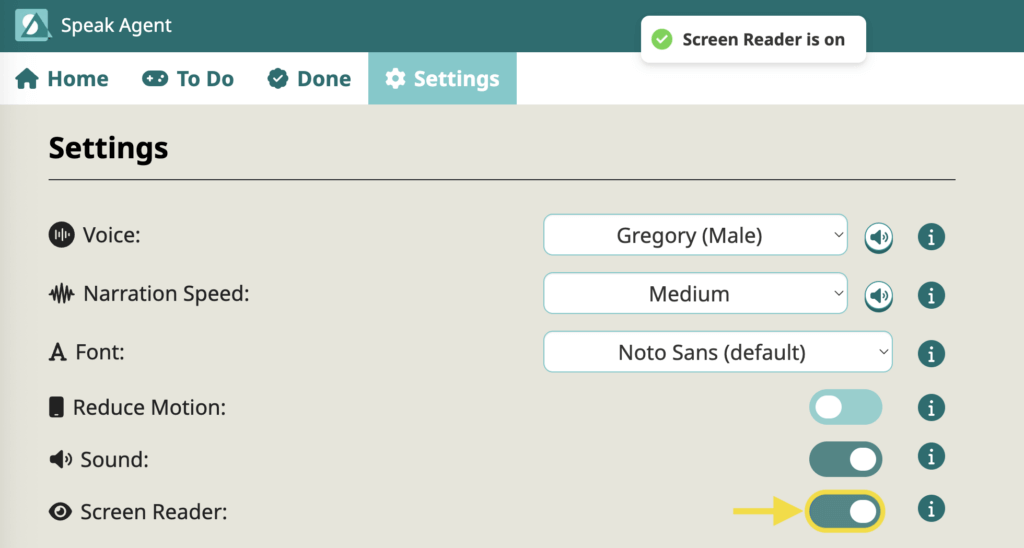
- The Screen Reader Mode prevents any audio conflict between the app and the screen reader.
- It also gives more pacing control to the student by giving them a key to press (enter/return) when they are ready to progress to the next matching pair.
In addition, we improved the tab navigation, enabling students who use tab order to complete the activity more quickly than ever before.
Drawing Board (Usability)
- Improved the clarity of the instructions by dividing the text into two parts: background information and the “to do” task description.
- Improved usability of the drawing and highlighter tools, making the free drawing process feel a lot smoother for students.
Admin Features
Reports
The Reports section for school and district leaders now includes two new columns: Target Dosage and % to Meeting Dosage.
- Target Dosage. This represents the number of Speak Agent activities that need to be completed in order to attain the full benefits of the program. This target will change based on the date range you choose for the report.
- % to Meeting Dosage. This column uses a simple bar chart to show the progress that a class or school has made toward fulfilling the Target Dosage during the date range you select. Note: Research shows that the learning benefits continue to accrue linearly up to 125% of dosage — and up to 250% of dosage for English learners.

Bug Fixes
- None this release.
What’s Next?
Next, we are working on an “adoption journey” that will help teachers who are new to Speak Agent to navigate the onboarding process and to get connected with the right resources. It will also give school leaders resources to support them!
We are also exploring ways to enhance the My Voice activity, to improve lesson search, and to provide a tool for teachers to showcase visual representations that students create in Drawing Board.
As always, we’d love to hear from you if you’d like to share feedback on the new features or share your wishlist. So please don’t hesitate to contact your support team!