Directions:
Read Alongs are mini ebooks. They cover a topic related to your teacher’s lesson plan in a short story format. The stories use your new vocabulary words. The goal is to help you see what the words mean. Most are 5 to 8 pages long.
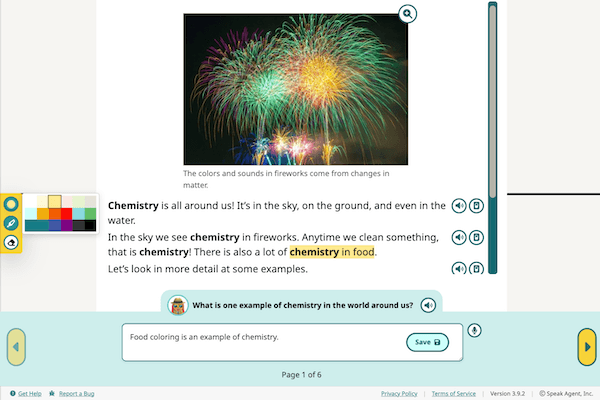
- There is one question on each page. You have to answer it to move to the next page.
- You can type an answer and press Save.
- You can record your voice by pressing the
 icon. If you don’t like your recording, press
  to wipe it.
 - You can both type and record an answer, if you wish.
- Remember: Your teacher can see/hear whatever you write or speak, so make it good!
- Press Next to go to the next page.
- There are many reading tools you can use, if you want:
- You can play audio for any paragraph.
- Feel free to adjust the narration speed!
- Press
 to dim the screen around the text you’re reading.
 - You can magnify text or an image to make it larger.
- You can highlight text in a any color to help you remember key facts.
- You can play audio for any paragraph.
- The activity is done when you add answers to every page.
- Your answers get stored under My Work. You can see them. Your teacher can also see them.
Is the Color Panel Blocking Your View?
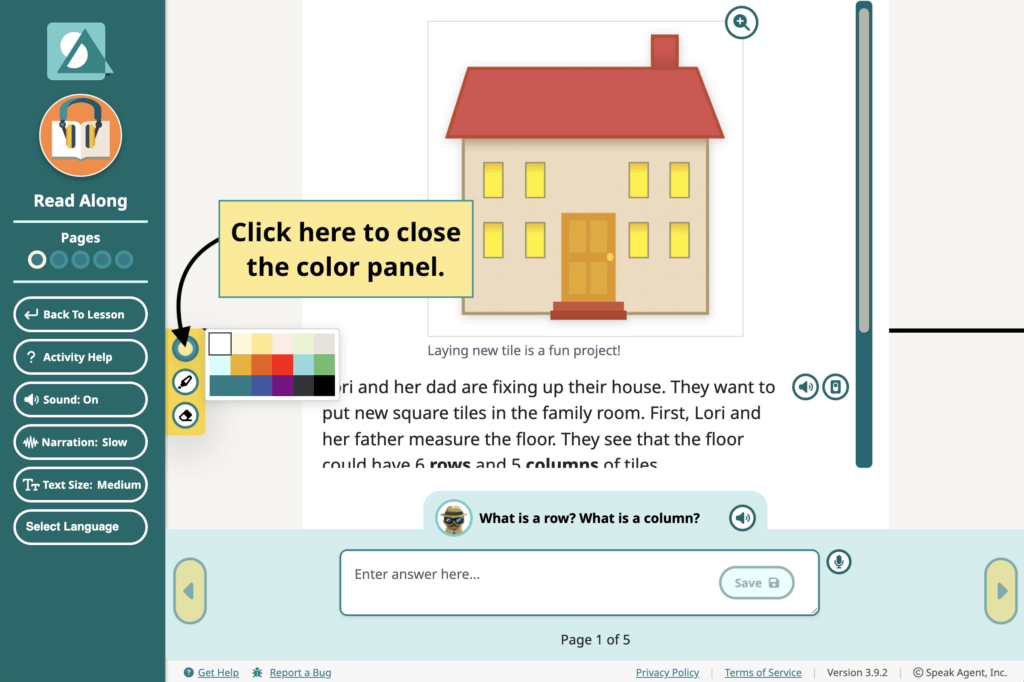
See the image below for how to hide the color panel:

Mission accomplished!