
Directions:
Explain Your Work is a three-level writing activity. Use it to explain solutions, justifications, proofs, error analyses, and more! For more help, press the ? Activity Help button on the left side of the activity.
Level 1: Click an Image to Fill in each Blank
- The activity starts with fill-in-the-blank sentences. It works a lot like the Tall Tales activity.
- Press Check Your Work when you think you’ve got the answers right.
- If there’s any mistakes, don’t worry! Just try different answers and press Check Your Work again.
- Once you pass Level 1, move on to Level 2! The activity will auto-save at this point.
Level 2: Type Into Each Blank to Finish the Sentences
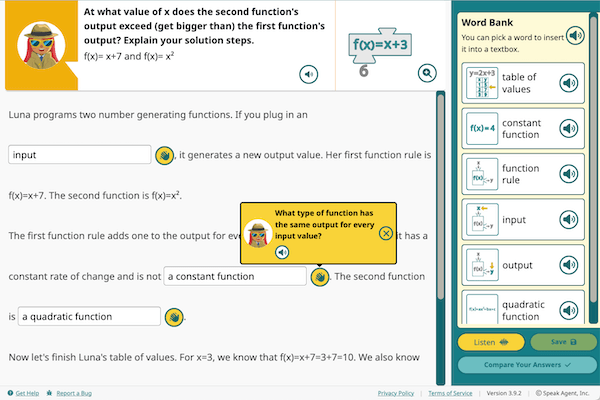
- In this level there are blanks you can type into instead of choosing words. Press the hand icon
 for a hint if you are not sure what to write.
 - The Word Bank on the right side has keywords from the unit vocabulary list. Some words might be helpful to fill in some of the blanks. Press a word to insert it into the blank field where your cursor is.
- Once you are happy with your answers in all of the boxes, press Compare Your Answers (bottom-right).
Compare Your Answers
- Compare your answers against our example answers. Maybe your answer will even be better!
- The bolded text compares your answer vs. our answer. What you typed into those empty boxes in Level 2 shows on the left column. Our examples is in the right column.
- For each answer you compare, please choose a comment like “The answers are exactly the same” or “The answers are very different.”
- When done, press Done Comparing (bottom-right). The activity will auto-save at this point.

Level 3: Write Your Own Explanation
- The moment of truth is here! You’ve had two levels to work on the problem. Now you have to explain it in your own words.
- Answer the question that you see in the top-left. Be sure to explain each step. Your teacher wants to see your reasoning (how you are thinking).
- Again, feel free to click the words from the Word Bank to add them. If they don’t seem useful, just ignore them.
- Press Save if you need to come back to this level later.
- If you want, you can record your voice to add to your written explanation. Press the Record button (bottom-right) to do this.
- Press Share with Teacher when you’re ready. This sends your work to their Inbox.
- Once your teacher approves your work, you are done! The activity will not be marked complete until your teacher approves it.
- If your teacher gives you feedback, it will pop up a message next time you sign into Speak Agent. Your teacher’s feedback will also show up inside the activity right above the text.

Mission accomplished!