
Directions:
Drawing Boards are creative spaces for you to draw or edit images such as diagrams, graphs, flowcharts, sketches, models, geometric figures, etc. in math and science. You can use Drawing Board to solve word problems and challenges or to show what you know by drawing, rather than by typing.
Each Drawing Board activity covers a topic related to your teacher’s lesson plan. Most of the time there’s an existing image you can overlay with your own drawings, shapes, or notes. Sometimes there may just be a blank space for you to create a drawing yourself.
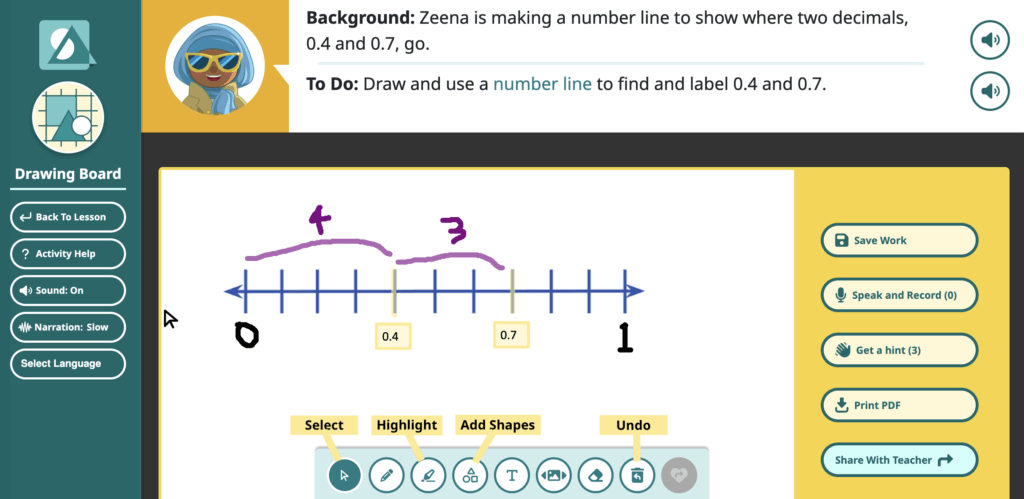
- Each Drawing Board has instructions at the top.
- Along the bottom are tools to free-draw, add shapes or highlights, add sticky notes with text, and other features.
- If you’re not sure how to get started, press Get a hint on the right side menu.
- Press Save Work if you need to take a break and come back later.
- You can also record your voice by pressing Speak and Record. If you don’t like your recording, press
 to wipe it.
- Press Share With Teacher when you are done!
- Your drawing gets stored under My Work. You can go back and see what you did later in the school year. Your teacher can also see your drawings once you share them.