• Skip to primary navigation
  • Skip to main content
  • Skip to footer
the Speak Agent logo

Speak Agent

  • About
    • About Speak Agent
    • Learning Supports for ELs and MLs
    • Helping Teachers
    • Teacher Spotlights
    • #1 in Instructional Technology
    • Awards and Media Coverage
    • WIDA ELD Standards
  • Programs
        • Programs Overview
        • What We Offer

        • Math + Language
          • Upper Elementary
          • Middle School
          • High School
          • Language in the Math Practices
        • Science + Language
          • Middle School
          • High School
  • Research & Evidence
        • Research Overview
        • What We've Learned

        • A Summary of Impact Studies
        • Four Hours, 10% Higher Math Scores
        • NSF Study Results with Science + Language
        • Student Engagement Matters!
        • The Learning Science Behind Speak Agent
        • Putting Theory into Practice
        • Effective for Multilingual Learners
        • ESSA Evidence
  • News & Insights
  • Talk to Us!
  • Sign In
  • Get Support
Home › Get Support for Speak Agent › Knowledge Base

Answer Studio Activity

Directions:

Answer Studio is a place where you can record yourself speaking answers to questions from the lesson. The goal is to give you a way of talking about the answers instead of writing. Maybe you know the answer, but don’t know to put it into words?
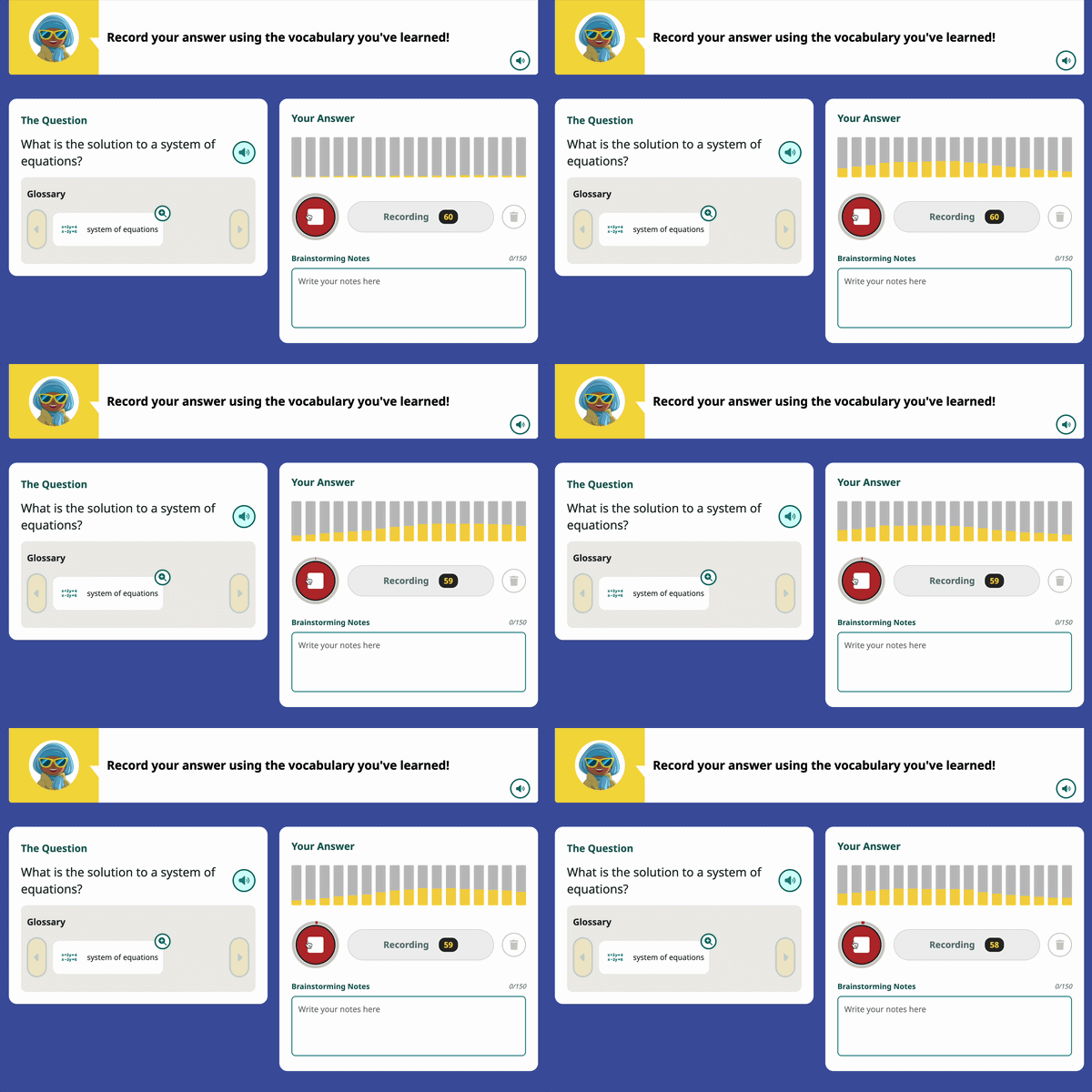
An animated screenshot of the Answer Studio activity
  1. You start with a menu of questions. You can answer them in any order you want.
  2. Once you click on a question, you can record your answer by pressing the large mic icon. record icon
    • Sometimes there will be an image or a Glossary of words that can help you understand the question.
    • You can also write down some Brainstorming Notes if that helps you put together your thoughts. You don’t have to use this field.
    • Once you start recording, you should see the equalizer (yellow sound bars) start to move. If you don’t, check your audio settings.
  3. Press the red stop icon to end your recording. It maxes out at 60 seconds.
    • If you don’t like your recording, press Trash can iconto wipe it and start over.
    • When you are ready, move on to the next question!

Footer

Speak Agent logo
  • About the Team
  • Frequently Asked Questions
  • Corporate Contact
  • LinkedIn
  • YouTube
  • Podcast

Stay informed!

Subscribe to monthly email updates from Speak Agent. (Dear Students: Sorry, this is for teachers only!)

© 2026 Speak Agent, Inc | Privacy Policy Terms of Service