The new Speak Agent version 3.9.0 introduces our new Program Adoption navigator for both teachers and administrators, a new bug reporting tool, and several small enhancements and bug fixes.
Program Adoption Navigator
This new feature is designed to help teachers who are new to Speak Agent to navigate the onboarding process and to give school leaders the resources to support their teams. The goal is to promote fidelity of implementation and achieve our recommended dosage of 10 activities per month. The evidence has demonstrated that this dosage has a significant, positive effect on student learning outcomes.
Watch a five-minute video introducing the new feature here.
Adoption Journey for Teachers
Teachers will find a new Program Adoption widget on their Speak Agent homepage that shows where they are in the four-step adoption journey. From the home page, they may drill down into more detail about their progress and next steps.
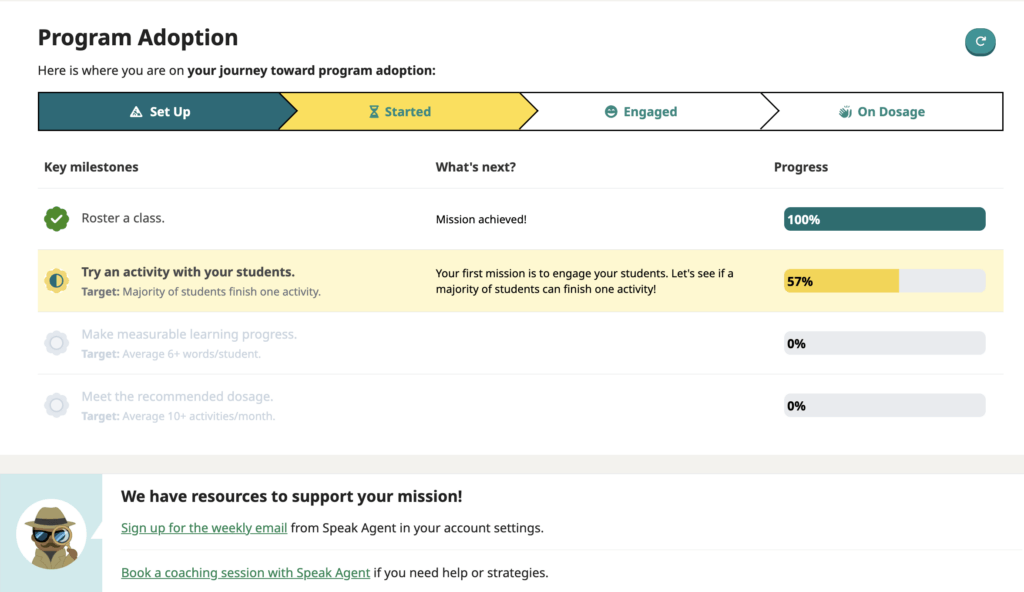
The Program Adoption page shows teachers the progress they have made so far, as well as the criterion needed to achieve the next milestone. Suggested resources and links are at the bottom of the page.
Please note: The % progress bars currently reflect only activities within a student’s enrolled course. For example, activities completed in Geometry won’t count for a student who is enrolled in Algebra.
Schoolwide Adoption Tracker
School and district leaders will find a new Teacher Adoption widget on their Speak Agent homepage that shows teacher adoption at their school. From the home page, they may drill down into more detail to view progress for individual teachers.
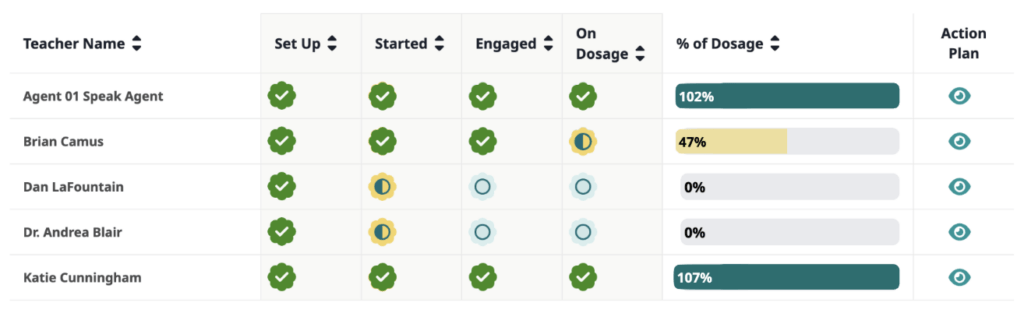
- School leaders may filter by content area (Math, Science, Social Studies) or search by teacher name.
- They may auto-generate a personalized Action Plan to connect each teacher with the right resources that can help them achieve the next milestone.
- Then they can copy the personalized Action Plan, including resource links, and paste right into an email or other message.
Bug Fixes and Enhancements
- Reduced loading times throughout the app.
- Increased the number of narration speed choices on the student sidebar from three to five different speeds.
- Fixed a bug with translation and caption audio when changing words in the Word Gallery activity.
- Fixed an issue with filtering portfolio items under My Work.
- Fixed a scrolling issue with Math Problem Maker in the Topic header.
- Fixed an issue with Diagram It! where the loading screen was not displaying the correct background color.
New Bug Reporting Tool for Students
Students may now safely report a bug or issue from inside the app. They just click on Report a Bug on the footer when inside of an activity.

The Speak Agent app automatically collects information about where they spotted the bug or issue and what type of technology they are using so that we can efficiently track down and fix the problem. No personally identifiable information is solicited. Students simply categorize the issue and press Send Answer. Then we reach out to the student’s teacher when the issue is resolved or if any further information is needed. Please know that Speak Agent never contacts students without advance permission in writing from the school district.
What’s Next?
We are currently working on the next wave of Accessibility improvements such as enhancing color contrast and making for a smoother screen reader experience.
Over the summer we will enhance the My Voice activity for all students by converting the user interface into an amazing recording studio experience with more embedded learning supports. We also plan to break out the Questions voice mode into a separate verbal explanations activity, complete with visual aids, hints, and inline vocabulary support.
Other plans include adding text transcriptions of student-made voice recordings, improving lesson search, and much, much more. Stay tuned!
As always, we love hearing from teachers and administrators about new features. Please feel free to share your feature ideas, wishlist, or feedback on recent updates. Just contact your support team!