
• Skip to primary navigation
  • Skip to main content
  • Skip to footer
the Speak Agent logo

Speak Agent

  • About
    • About Speak Agent
    • Helping Teachers
    • #1 in Instructional Technology
    • Learning Supports for ELs and MLs
    • WIDA ELD Standards
    • Awards and Media Coverage
  • Programs
        • Programs Overview
        • What We Offer

        • Math + Language
          • Upper Elementary
          • Middle School
          • High School
          • Language in the Math Practices
        • Science + Language
          • Middle School
          • High School
  • Research & Evidence
        • Research Overview
        • What We've Learned

        • A Summary of Impact Studies
        • Four Hours, 10% Higher Math Scores
        • NSF Study Results with Science + Language
        • Student Engagement Matters!
        • The Learning Science Behind Speak Agent
        • Academic Language Drives the Achievement Gap
        • Putting Theory into Practice
        • Effective for Multilingual Learners
        • ESSA Evidence
  • News & Insights
  • Talk to Us!
  • Sign In
  • Get Support
Home › Get Support & Help for Speak Agent › Knowledge Base

Drawing Board Activity

Directions:

Drawing Boards are creative spaces for you to draw or edit images such as diagrams, graphs, flowcharts, sketches, models, geometric figures, etc. in math and science. You can use Drawing Board to solve word problems and challenges or to show what you know by drawing, rather than by typing.

Each Drawing Board activity covers a topic related to your teacher’s lesson plan. Most of the time there’s an existing image you can overlay with your own drawings, shapes, or notes. Sometimes there may just be a blank space for you to create a drawing yourself.
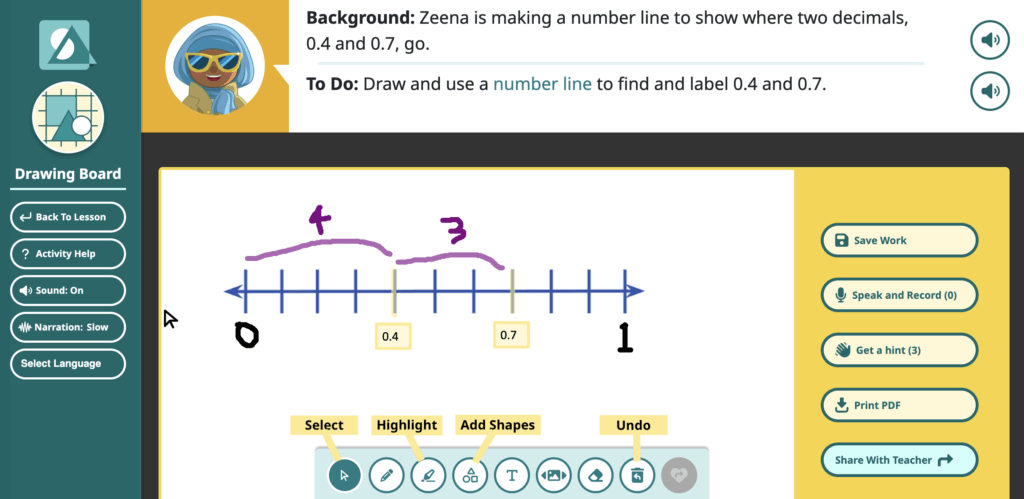
a screenshot of the Drawing Board activity with annotations for key functions
  1. Each Drawing Board has instructions at the top.
    • Along the bottom are tools to free-draw, add shapes or highlights, add sticky notes with text, and other features.
    • If you’re not sure how to get started, press Get a hint on the right side menu.
    • Press Save Work if you need to take a break and come back later.
    • You can also record your voice by pressing Speak and Record. If you don’t like your recording, press Trash can iconto wipe it.
  2. Press Share With Teacher when you are done!
  3. Your drawing gets stored under My Work. You can go back and see what you did later in the school year. Your teacher can also see your drawings once you share them.

Footer

Speak Agent logo
  • About the Team
  • Frequently Asked Questions
  • Corporate Contact
  • LinkedIn
  • YouTube
  • Podcast

Stay informed!

Subscribe to monthly email updates from Speak Agent. (Dear Students: Sorry, this is for teachers only!)

© 2026 Speak Agent, Inc | Privacy Policy Terms of Service